
Send Web Content to Telegram Securely
Overview
The Send-to-Telegram Chrome extension enables users to transmit website content directly to their Telegram Bot using the official Telegram API, bypassing third-party servers. This approach prioritizes privacy and data security by ensuring that content is delivered only through Telegram’s secure infrastructure. The tool is designed for individuals and professionals who frequently share web content—such as articles, links, or screenshots—with themselves or others via Telegram.
It is particularly useful for those managing personal knowledge bases, content curation workflows, or remote collaboration where immediate access to web material is essential. The extension is developed by phguo, who has made the source code publicly available on GitHub, allowing transparency and community review. This open-source nature supports trust and potential customization.
Real-world use cases include saving articles for later reading, sharing technical documentation with team members, or archiving web-based resources without relying on cloud-based tools. The developer did not provide additional system requirements or specific user profiles beyond general accessibility.
Key Features & Capabilities
- Direct API Integration – The extension uses Telegram’s official API to send content, eliminating reliance on intermediary servers and reducing data exposure risks.
- Privacy-First Design – All data is transmitted directly from the browser to the user’s Telegram Bot, ensuring no third-party interception or storage.
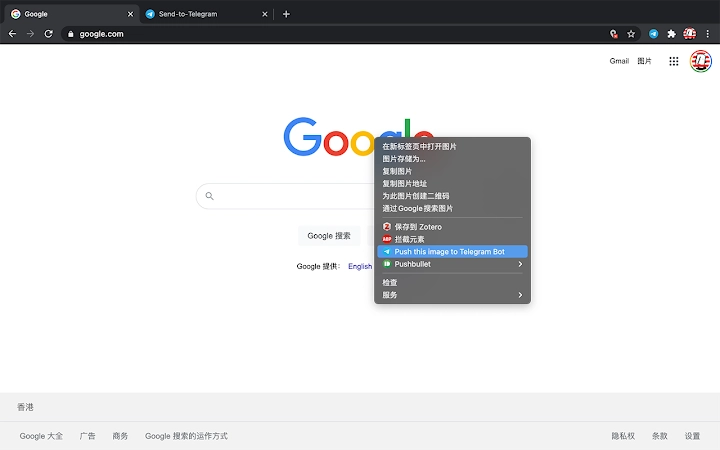
- Simple Content Sharing – Users can send entire web pages, selected text, or screenshots with minimal steps, ideal for quick archiving or sharing.
- Open-Source Transparency – The full source code is hosted on GitHub, enabling users to verify functionality and contribute improvements.
- Minimal Setup Process – After creating a Telegram Bot and obtaining the API token and user_id, users can begin sharing content immediately.
For example, a researcher can capture a complex article from a scientific journal and send it directly to their personal Telegram bot for later review. A developer might share a snippet of code from a documentation page with a teammate without uploading it to a shared drive. The extension supports workflows where speed, security, and control over data are critical. It operates entirely within the browser environment, requiring no additional software or server infrastructure. The developer did not specify advanced automation features or batch processing capabilities.
User Interface, Workflow & Performance
The extension’s interface is minimal and integrated directly into the Chrome browser’s toolbar. Users interact with it through a small icon that appears when the extension is active. Clicking the icon opens a simple popup with options to send the current page, selected text, or a screenshot.
The workflow is streamlined: after setup, users can send content with a single click. Navigation is intuitive, with no complex menus or configuration layers. The design prioritizes speed and simplicity, aligning with the tool’s purpose as a lightweight utility.
Performance is expected to be efficient, as the extension operates client-side and leverages Telegram’s API for delivery. However, exact performance details were not specified. The developer did not provide information on CPU or RAM usage.
Stability is likely consistent, given the extension’s lightweight nature and direct API integration. No reported crashes or errors were mentioned in the available documentation. General software behavior patterns suggest reliable operation under normal browser conditions.
Compatibility & System Requirements
The extension is compatible with Windows, Mac, and Linux operating systems, ensuring broad accessibility across desktop environments. It is designed for use with the Chrome browser, which is required for full functionality. The installation size is 1.2 MB, indicating a lightweight footprint that does not significantly impact system resources.
The software version is 1.0.0, released on August 10, 2024. Exact system requirements were not listed. Compatibility information was partially provided, focusing on platform and browser support.
No specific hardware requirements were mentioned. Users should ensure their system meets the baseline standards for running Chrome, including up-to-date system updates and a stable internet connection. The developer did not specify any additional dependencies or prerequisites beyond the browser environment.
Pros and Cons
Pros
- Direct transmission via Telegram’s official API ensures secure and private content delivery.
- Open-source nature allows for transparency and community trust.
- Minimal setup with clear instructions for bot creation and token acquisition.
- Lightweight at 1.2 MB, with no noticeable impact on system performance.
- Available for free, making it accessible to all users regardless of budget.
Cons
- Requires technical setup: users must create a Telegram Bot and obtain API credentials manually.
- Limited to Chrome browser; no support for other browsers was indicated.
- No built-in user interface for managing sent content or history.
- Basic functionality without advanced automation or scheduling features.
- Dependent on user’s Telegram account and internet connectivity for operation.
FAQ Section
Is the extension free to use?
Yes, the extension is available at no cost. It is distributed as free software with no hidden fees or subscription models.
Which browsers are supported?
The extension is designed for use with the Chrome browser. Compatibility with other browsers was not confirmed in the provided information.
Is my data secure when using this extension?
Yes, the extension sends content directly to your Telegram Bot using the official API, without passing through third-party servers. This ensures that your data remains under your control and is not stored or shared with external entities.
How do I set up the extension?
To set up the extension, you need to create a Telegram Bot via BotFather, obtain the API token and your user_id by sending a message to the bot and checking the updates endpoint. Once these credentials are entered, the extension is ready to use.
Can I use this extension offline?
No, the extension requires an active internet connection to communicate with Telegram’s API. It cannot function without connectivity.
Final Thoughts
The Send-to-Telegram Chrome extension offers a focused, secure, and privacy-conscious solution for sharing web content directly to a Telegram Bot. Its core strength lies in bypassing third-party intermediaries, ensuring data integrity and confidentiality. The open-source model adds credibility, while the minimal design keeps the user experience clean and efficient.
While it lacks advanced features like content history or automation, it excels in simplicity and security. It is best suited for tech-savvy users, researchers, developers, and professionals who value control over their data and need a reliable way to archive or share web content. For those seeking a straightforward, free tool that prioritizes privacy, this extension delivers a compelling value proposition.
Download Send-to-Telegram Chrome extension now.







